The short answer
A true one-cable monitor replaces friction: display cable, charger, USB hub, and sometimes Ethernet or device switching. We rank the workflow, not the port label.
What separates the right monitor from the impressive one
Read the wattage
Power delivery should be compared with the laptop charger and workload. Ninety watts suits many performance laptops; lower figures may still be ideal for thin-and-light systems.
Separate upstream and downstream
A USB-C upstream connection carries video and data from the laptop. Downstream ports connect peripherals. Product pages often blur the distinction.
KVM is a workflow feature
If two computers share the monitor, a built-in KVM can switch USB peripherals with the display input—but implementation quality and port mapping vary.
Who this guide is for
Laptop-centered buyers trying to replace a nest of cables and adapters with one verified connection.
The Panel Pulse shortlist

Best for a no-compromise work-and-gaming desk
ASUS PG32UCDM
Few current monitors cover this much ground: 4K density for desktop work, OLED contrast, 240Hz motion, and one-cable laptop utility.
- Format
- 32-inch · 4K UHD
- Motion
- 240Hz · QD-OLED
- Connection
- USB-C with 90W power delivery
OLED care matters when the same static desktop stays visible for long workdays, and the premium only makes sense if your GPU can use it.

Best for a dependable travel screen for laptop work
ASUS ZenScreen MB169CK
The flexible kickstand, dual USB-C input, and established support channel matter more here than headline performance.
- Format
- 15.6-inch · 1920 × 1080
- Motion
- 60Hz · IPS
- Connection
- Dual USB-C and Mini HDMI
It is a work-first 60Hz portable display; buyers seeking console motion performance should look at faster alternatives.
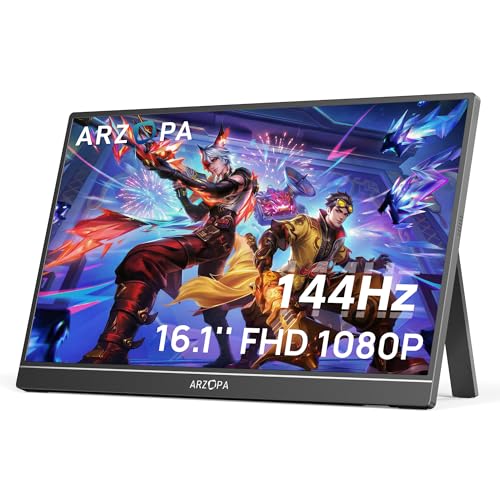
Best for travel gaming and a fast second screen
ARZOPA Z1FC
A larger 16.1-inch panel and 144Hz refresh distinguish it from generic 60Hz travel screens without abandoning portability.
- Format
- 16.1-inch · 1920 × 1080
- Motion
- 144Hz · IPS
- Connection
- USB-C and HDMI
One-cable operation depends on the laptop or console port supporting both video and sufficient power.

Best for a low-cost second screen for travel
MNN Portable Monitor
Its current bestseller position reflects demand for a simple, lightweight second screen.
- Format
- 15.6-inch · 1920 × 1080
- Motion
- 60Hz · IPS
- Connection
- USB-C and HDMI
Generic portable monitors can vary by revision; verify the current port layout, included cables, warranty, and return path.
CERTAIN CONTENT THAT APPEARS ON THIS SITE COMES FROM AMAZON. THIS CONTENT IS PROVIDED “AS IS” AND IS SUBJECT TO CHANGE OR REMOVAL AT ANY TIME.
Decision lab
Compare what changes the experience
Select up to three. We leave price out because stale precision is worse than none.
| Signal | ASUS PG32UCDM | ASUS ZenScreen MB169CK | ARZOPA Z1FC |
|---|---|---|---|
| Format | 32-inch | 15.6-inch | 16.1-inch |
| Resolution | 4K UHD | 1920 × 1080 | 1920 × 1080 |
| Refresh | 240Hz | 60Hz | 144Hz |
| Panel | QD-OLED | IPS | IPS |
| Connection | USB-C with 90W power delivery | Dual USB-C and Mini HDMI | USB-C and HDMI |
| Best for | A no-compromise work-and-gaming desk | A dependable travel screen for laptop work | Travel gaming and a fast second screen |
| Watch for | OLED care matters when the same static desktop stays visible for long workdays, and the premium only makes sense if your GPU can use it. | It is a work-first 60Hz portable display; buyers seeking console motion performance should look at faster alternatives. | One-cable operation depends on the laptop or console port supporting both video and sufficient power. |
| Next step | Check price on Amazon | Check price on Amazon | Check price on Amazon |
Questions buyers ask before they choose
Can every USB-C monitor charge a laptop?
No. Check whether the port supports USB Power Delivery and its maximum wattage. Some USB-C ports carry video or data with little or no charging power.
Does USB-C support 4K high refresh rates?
It can, depending on DisplayPort Alt Mode version, link bandwidth, compression, color depth, and whether bandwidth is shared with USB data.
Is Thunderbolt required for a USB-C monitor?
No. DisplayPort Alt Mode over USB-C is enough for many single-monitor setups. Thunderbolt can add bandwidth and daisy-chaining options, but both devices must support the relevant features.
Keep narrowing the decision
Free decision sheet
Don’t compare 40 specs. Compare the seven that matter.
Get our monitor buying checklist now. We’ll store your preference, but we won’t send marketing email until our full mailing details are published.