The short answer
We separate fixed-desk and portable needs because a USB-C travel screen solves a different problem from a high-density primary display.
What separates the right monitor from the impressive one
Scaling changes usable space
macOS often renders at a higher internal resolution and scales the interface. Evaluate effective workspace and sharpness together rather than relying on native pixel count alone.
Power delivery must match the Mac
A monitor that supplies enough power can replace the laptop charger. Lower wattage may charge slowly or allow battery drain under sustained load.
Count displays by exact chip
Native external-display support varies across Apple silicon models and generations. Verify the specific Mac, not just the words MacBook Pro.
Who this guide is for
MacBook Pro owners who want dependable scaling, charging, and connectivity rather than a generic compatibility promise.
The Panel Pulse shortlist

Best for crisp desktop work with smoother everyday motion
Dell 27 Plus 4K
This pairs 4K text density with a 120Hz refresh and an established productivity design, giving non-OLED buyers a more relaxed long-day option.
- Format
- 27-inch · 4K UHD
- Motion
- 120Hz · IPS
- Connection
- HDMI and DisplayPort
There is no USB-C laptop dock in the specification, and scaling is part of the 27-inch 4K experience rather than an optional edge case.

Best for a no-compromise work-and-gaming desk
ASUS PG32UCDM
Few current monitors cover this much ground: 4K density for desktop work, OLED contrast, 240Hz motion, and one-cable laptop utility.
- Format
- 32-inch · 4K UHD
- Motion
- 240Hz · QD-OLED
- Connection
- USB-C with 90W power delivery
OLED care matters when the same static desktop stays visible for long workdays, and the premium only makes sense if your GPU can use it.

Best for home-office work with after-hours gaming
Dell S2725DSM
QHD at 27 inches, 144Hz, and a fully adjustable stand cover the practical middle of the market with few obvious gaps.
- Format
- 27-inch · 2560 × 1440
- Motion
- 144Hz · IPS
- Connection
- HDMI and DisplayPort
It is a balanced display, not an HDR specialist; buyers should value ergonomics and clarity more than badge-driven spectacle.

Best for broad desktop space without a gaming-first design
Dell S3425DW
The 120Hz ultrawide formula prioritizes smooth everyday use and multitasking rather than chasing esports specifications.
- Format
- 34-inch · 3440 × 1440
- Motion
- 120Hz · VA
- Connection
- HDMI and DisplayPort
Check port needs carefully: a productivity ultrawide without the right USB-C or KVM arrangement can still require a dock.

Best for a dependable travel screen for laptop work
ASUS ZenScreen MB169CK
The flexible kickstand, dual USB-C input, and established support channel matter more here than headline performance.
- Format
- 15.6-inch · 1920 × 1080
- Motion
- 60Hz · IPS
- Connection
- Dual USB-C and Mini HDMI
It is a work-first 60Hz portable display; buyers seeking console motion performance should look at faster alternatives.
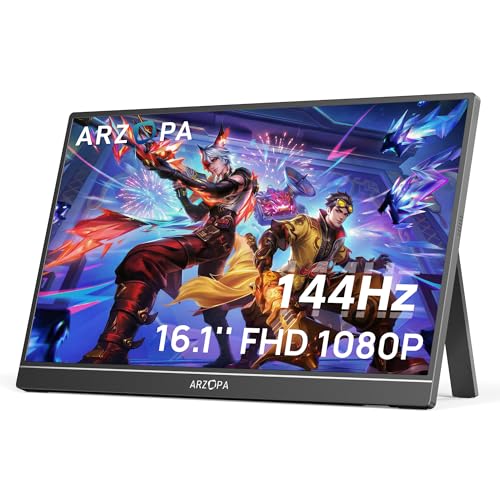
Best for travel gaming and a fast second screen
ARZOPA Z1FC
A larger 16.1-inch panel and 144Hz refresh distinguish it from generic 60Hz travel screens without abandoning portability.
- Format
- 16.1-inch · 1920 × 1080
- Motion
- 144Hz · IPS
- Connection
- USB-C and HDMI
One-cable operation depends on the laptop or console port supporting both video and sufficient power.
CERTAIN CONTENT THAT APPEARS ON THIS SITE COMES FROM AMAZON. THIS CONTENT IS PROVIDED “AS IS” AND IS SUBJECT TO CHANGE OR REMOVAL AT ANY TIME.
Decision lab
Compare what changes the experience
Select up to three. We leave price out because stale precision is worse than none.
| Signal | Dell 27 Plus 4K | ASUS PG32UCDM | Dell S2725DSM |
|---|---|---|---|
| Format | 27-inch | 32-inch | 27-inch |
| Resolution | 4K UHD | 4K UHD | 2560 × 1440 |
| Refresh | 120Hz | 240Hz | 144Hz |
| Panel | IPS | QD-OLED | IPS |
| Connection | HDMI and DisplayPort | USB-C with 90W power delivery | HDMI and DisplayPort |
| Best for | Crisp desktop work with smoother everyday motion | A no-compromise work-and-gaming desk | Home-office work with after-hours gaming |
| Watch for | There is no USB-C laptop dock in the specification, and scaling is part of the 27-inch 4K experience rather than an optional edge case. | OLED care matters when the same static desktop stays visible for long workdays, and the premium only makes sense if your GPU can use it. | It is a balanced display, not an HDR specialist; buyers should value ergonomics and clarity more than badge-driven spectacle. |
| Next step | Check price on Amazon | Check price on Amazon | Check price on Amazon |
Questions buyers ask before they choose
Do Macs need special monitors?
No. Standard monitors work, but resolution, scaling, USB-C power delivery, cable bandwidth, HDR behavior, and color settings affect the quality of the experience.
Is 4K good for MacBook Pro?
Yes. At 27 or 32 inches it can deliver sharp text and flexible scaling. The exact apparent workspace depends on the selected scaled resolution.
Can one USB-C cable connect and charge a MacBook Pro?
Yes, when the monitor supports USB-C video and sufficient USB Power Delivery. Check wattage, cable rating, and whether the monitor’s hub features meet your needs.
Keep narrowing the decision
Free decision sheet
Don’t compare 40 specs. Compare the seven that matter.
Get our monitor buying checklist now. We’ll store your preference, but we won’t send marketing email until our full mailing details are published.